In March 2025, Apple’s 13-inch MacBook Air started at $999. A little over a year later, its starting list price had reached $1,299. That’s $300 more just to get into a MacBook Air.
Apple isn’t the only company facing rising computer costs. And one of the biggest reasons has surprisingly little to do with laptops themselves. It has to do with the billions of dollars companies are spending on artificial intelligence.
There’s another wrinkle, too: a laptop can become a worse deal without its price increasing at all. Understanding what’s happening inside the computer industry can help you decide whether to buy now, wait, or keep the laptop you already have.
Key Takeaways
- AI data center demand is putting pressure on laptop memory and SSD prices.
- Chip factories take years and billions of dollars to build, limiting quick supply increases.
- A laptop can become a worse deal if its price stays unchanged but specifications shrink.
- Buy when you need a replacement, and compare RAM, storage, and memory upgradeability.
The Three Components Driving Laptop Costs
To understand why laptops are getting more expensive, start with three components inside your computer:
- Processor, or CPU: Essentially the brain of your computer, responsible for processing instructions.
- RAM: The temporary workspace that holds information your computer is actively using.
- SSD: The storage that holds your files, applications, and other saved information.
All three have become more expensive for manufacturers, particularly memory and storage.
According to TrendForce’s laptop component cost research, the CPU, RAM, and SSD accounted for roughly 45% of the total parts cost in a typical $900 laptop in early 2025. By 2026, that share had reached 68%.
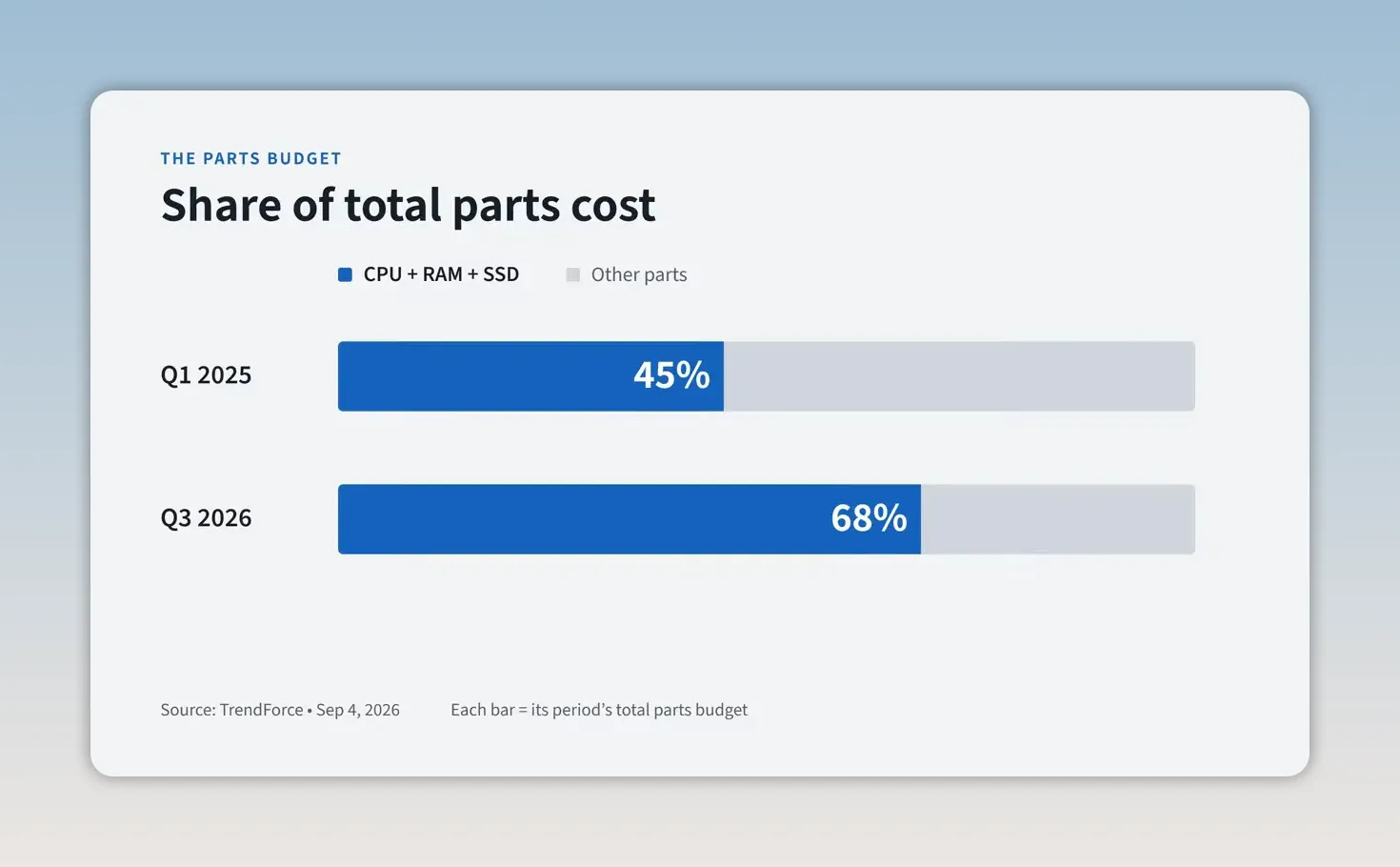
That percentage refers to the manufacturer’s parts budget, not the laptop’s retail price. But it shows why these components are putting so much pressure on the cost of the finished computer.
How the AI Boom Pushes Up RAM and SSD Prices
This isn’t simply a case of more people buying laptops. And it isn’t just inflation or tariffs.
Microsoft, Google, Amazon, and Meta are spending billions building AI data centers. Those facilities are filled with powerful computers that need enormous amounts of memory.
The specialized memory used for AI isn’t the same product as the RAM in your laptop. However, many of the same manufacturers make both, and their manufacturing capacity is limited.
Imagine you run a memory chip factory. One customer wants memory for everyday laptops. Another wants specialized memory for AI servers, is placing massive orders, and offers the potential for much higher profits.
Which customer would you prioritize? Probably the one paying more.
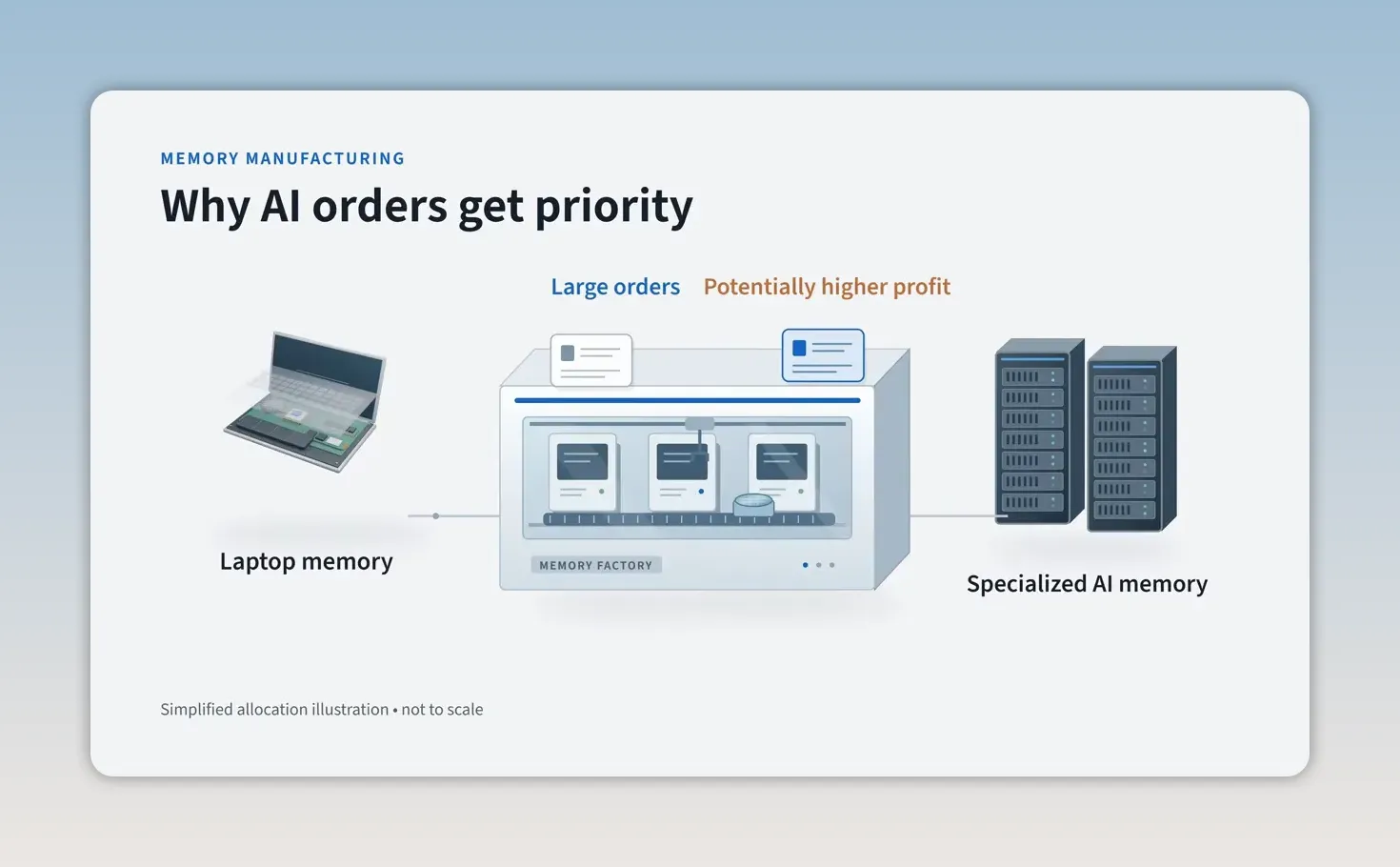
That’s why memory manufacturers are directing production resources toward AI servers and other higher-value products. The result is pressure on the supply of memory available for everyday laptops, which pushes prices upward.
Storage faces a related problem. AI data centers also need enormous amounts of storage, putting pressure on SSD prices.
Even if you’ve never used ChatGPT, the AI boom could still make your next laptop more expensive. You don’t have to use the technology to feel its effects on the hardware supply chain.
Why Chipmakers Can’t Simply Make More
If demand is so strong, why don’t manufacturers just produce more chips?
Building a semiconductor factory isn’t quite like opening another cookie shop. These facilities can cost billions of dollars, require specialized equipment, and take years to start producing chips. Expanding an existing factory takes time, too.
There’s also a financial risk. A manufacturer might invest heavily in additional capacity, only to find that demand has slowed by the time the new production comes online. Then it has more chips than customers want.
The memory industry has experienced both shortages and oversupply before. That history gives manufacturers a reason to be cautious about expanding too quickly.
So even when there’s a strong incentive to increase supply, it isn’t an instant fix. In the meantime, laptop manufacturers have to deal with higher component costs.
The MacBook Air Example: Higher Prices, Then the Same Specs
The MacBook Air shows how quickly pricing can change, and why it’s important to distinguish a more expensive upgrade from a price increase on unchanged hardware.
- March 2025: The 13-inch M4 MacBook Air launched at $999 with 16GB of memory and a 256GB SSD.
- March 2026: The M5 MacBook Air launched at $1,099 with 16GB of memory and a 512GB SSD.
- A few months later: The same M5 configuration, still with 16GB of memory and a 512GB SSD, increased to $1,299.
The first $100 increase came with something extra: a faster processor and twice the starting storage. Apple’s M5 MacBook Air launch announcement provides the launch details.
The next increase was different. The price rose another $200 without an improvement to the specifications.
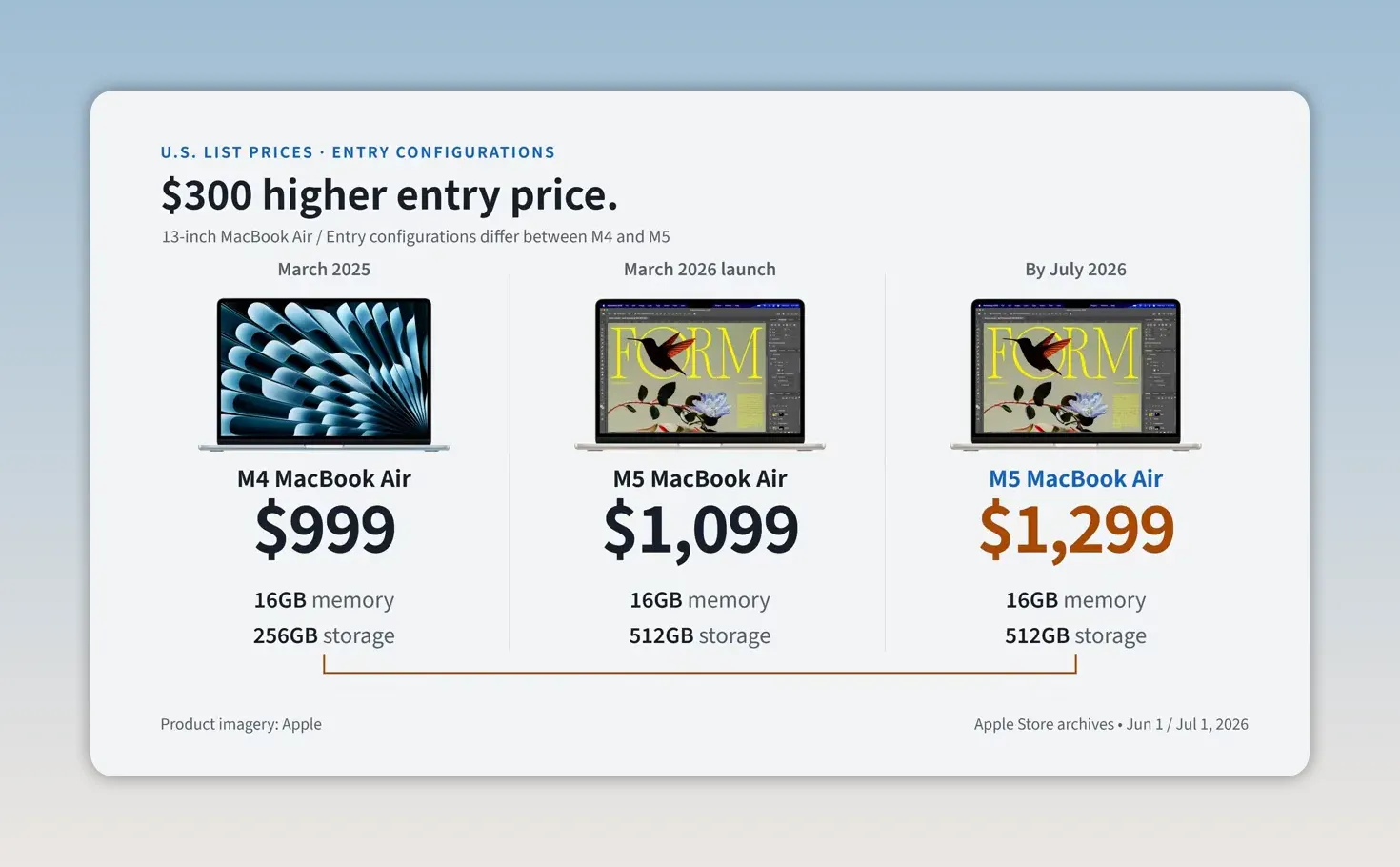
Compared with the previous year’s starting price, that made the entry point $300 higher.
These are U.S. Apple list prices, not necessarily the lowest prices available from retailers. Discounts can change the picture, so check Apple’s current Mac pricing and compare actual offers rather than assuming every seller charges the list price.
How a Laptop Becomes a Worse Deal Without a Price Increase
When components get more expensive, laptop manufacturers have three basic options. Suppose a company has been selling a laptop for $900.
1. Raise the Price
The manufacturer could increase the price from $900 to $1,100. That helps cover higher costs, but it could also persuade customers to choose something else or keep their existing computer.
2. Absorb the Higher Costs
The company could keep selling the laptop for $900 and make less money on each one. That might work temporarily, but accepting lower profits is difficult to sustain.
3. Keep the Price and Change What’s Inside
This is the option that’s easiest to miss when shopping.
Imagine last year’s $900 laptop included 16GB of RAM and a 512GB SSD. This year’s model still costs $900, but now it comes with only 8GB of RAM or less storage.
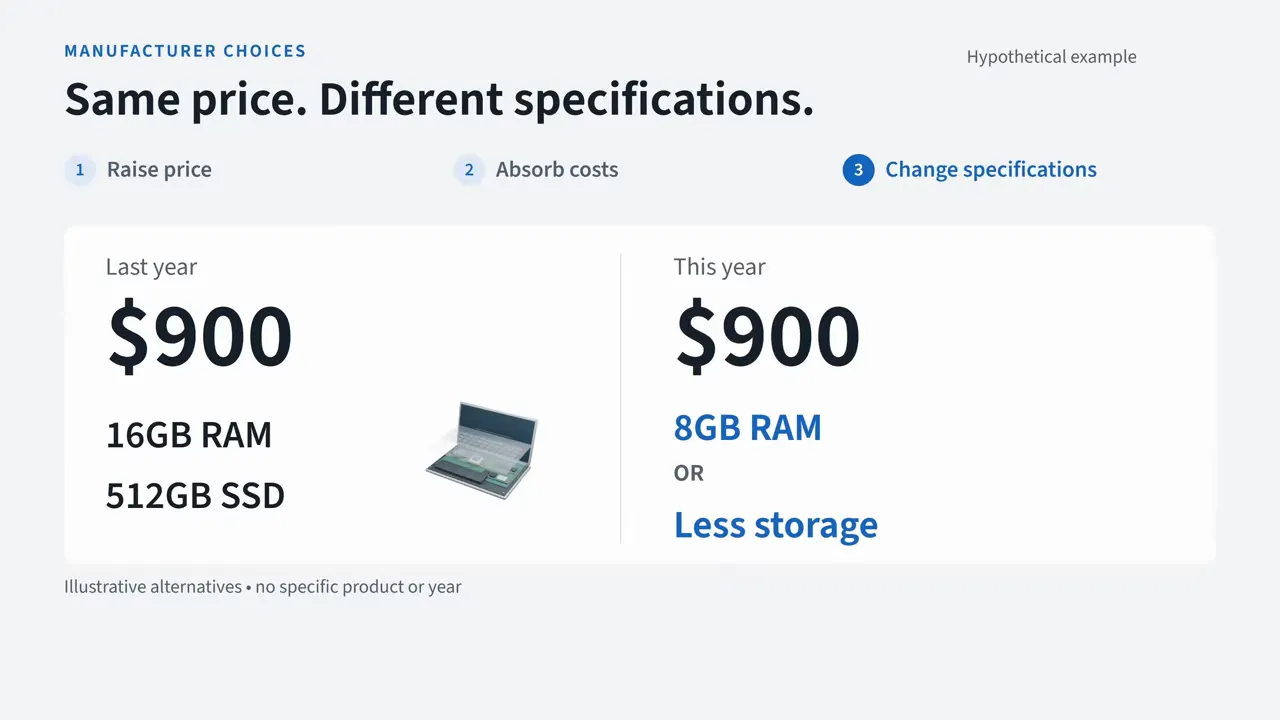
That’s a hypothetical example, not a claim about a particular model. But it illustrates an important point: an unchanged price doesn’t guarantee unchanged value. You could spend exactly the same amount and get a less capable computer.
This matters even more because many modern laptops have RAM soldered directly to the motherboard. You can’t simply add more memory later. The specifications you choose today could be the ones you live with for years.
Should You Buy a Laptop Now or Wait?
Laptop prices could eventually come down. But TrendForce’s memory supply outlook points to tight supply continuing well into 2027. And even when component costs fall, it can take time for those savings to reach consumers.
If you need a new laptop, I wouldn’t necessarily wait for prices to drop. But I also wouldn’t rush to replace a computer that still works well just because prices might rise.
Instead, pay attention to what you’re getting for your money:
- Compare RAM and storage: Look beyond the headline price and check the exact configuration.
- Consider last year’s models: Include them in your comparison rather than focusing only on the newest release.
- Check memory upgradeability: Find out whether you can add RAM later or whether the amount is fixed.
- Match memory to your work: For most everyday tasks, I’d aim for at least 16GB of RAM. For more demanding work, 32GB makes more sense.
The best time to buy a new laptop is when you actually need one, not when you’re worried about what prices might do next.
AI isn’t just changing what computers can do. It’s also changing what they cost. The next time you shop for a laptop, don’t just compare prices. Compare what you’re actually getting for your money.


